import requests
import json

# Set up API endpoint and access token
endpoint = "https://api.openai.com/v1/chat/completions"
access_token = "YOUR_ACCESS_TOKEN"

# Set up headers for authorization
headers = {
    "Content-Type": "application/json",
    "Authorization": f"Bearer {access_token}"
}


# Define the prompt you want to send to the API
prompt = "Say this is a test!"

# Set up the data to send in the request
data = {
     "model": "gpt-3.5-turbo",
     "messages": [{"role": "user", "content": prompt}],
     "temperature": 0.7

   }

# Send the request to the API and receive the response
response = requests.post(endpoint, headers=headers, data=json.dumps(data))

# Get the generated text from the response
result = json.loads(response.text)["choices"][0]["message"]['content']

# Print the generated text
print(result)
Make sure to replace YOUR_ACCESS_TOKEN with your actual OpenAI API access token. You can obtain an access token by signing up for OpenAI’s API at https://beta.openai.com/signup/. You can also adjust the parameters of the data dictionary to modify the behavior of the API, such as the maximum number of tokens to generate (max_tokens) and the “temperature” of the output.
To get an access token:
Go to the OpenAI website and create an account. If you already have an account, simply log in.
Once you’re logged in, go to the “API” section of the website and select the Chat GPT API.
Choose the plan that best suits your needs. OpenAI offers both a free plan and paid plans with more features and higher usage limits.
After selecting your plan, you’ll be asked to provide some additional information, such as your name, email address, and payment information (if you choose a paid plan).
Once you’ve provided all the necessary information and completed the sign-up process, you’ll be given an access token that you can use to authenticate your requests to the Chat GPT API.
You can then start using the API by making requests using your access token, which will allow you to generate text and engage in conversations with the Chat GPT model.
Note that the process for obtaining an access token may vary slightly depending on the specific plan you choose and any changes to OpenAI’s sign-up process. However, these steps should give you a general idea of what to expect when signing up for the Chat GPT API.
Geocoding is the process of converting a text address or location description into geographic coordinates (latitude and longitude). Python provides several libraries for geocoding, including Geopy, Geocoder, and Google Maps Geocoding API. In this article, we will use Geopy and Google Maps Geocoding API to geocode text location data in Python.
Step 1: Installing Geopy
To install Geopy, you can use the following command:
pip install geopy
Step 2: Importing Geopy
To use Geopy, you need to import the geopy library:
from geopy.geocoders import GoogleV3
Step 3: Geocoding text location data using Google Maps Geocoding API
To geocode text location data using Google Maps Geocoding API, you need to have an API key. You can obtain an API key by following the instructions provided in the Google Maps Geocoding API documentation.
from geopy.geocoders import GoogleV3

# Replace YOUR_API_KEY with your actual API key
geolocator = GoogleV3(api_key='YOUR_API_KEY')

location = "1600 Amphitheatre Parkway, Mountain View, CA"

# Geocode location
address, (latitude, longitude) = geolocator.geocode(location)

print("Location: ", address)
print("Latitude: ", latitude)
print("Longitude: ", longitude)
In this example, we used the geocode() method of the GoogleV3 class to geocode the location "1600 Amphitheatre Parkway, Mountain View, CA". The geocode() method returns a tuple containing the address and the latitude and longitude of the location.
Step 4: Geocoding multiple text location data using Google Maps Geocoding API
You can also geocode multiple text location data at once using Google Maps Geocoding API. Here’s an example:
from geopy.geocoders import GoogleV3

# Replace YOUR_API_KEY with your actual API key
geolocator = GoogleV3(api_key='YOUR_API_KEY')

locations = ["1600 Amphitheatre Parkway, Mountain View, CA",
             "1 Infinite Loop, Cupertino, CA",
             "350 Fifth Avenue, New York, NY"]

for location in locations:
    # Geocode location
    address, (latitude, longitude) = geolocator.geocode(location)

    print("Location: ", address)
    print("Latitude: ", latitude)
    print("Longitude: ", longitude)
    print()
In this example, we used a for loop to iterate over the list of locations and geocode each location using the geocode() method of the GoogleV3 class.
The basis of this problem is that there are 100 prisoners. The prisoners are taken to a room with 100 boxes each containing a random prisoners’ ID within them. The (clearly maniacle) prison guards say that:
Each prisoner is to open no more than 50 boxes to find their number
If every prisoner finds the box which contains their number, they are all set free
If even one prisoner fails to find their box, they are all executed
They are allowed to strategise beforehand but must complete the task one-by-one.
So the solution to this problem, is to increase the probability as much as possible that every prisoner will find their number. If every prisoner were to search randomly, the probability is 50% (for each prisoner) and overall it becomes 1/2 * 1/2 * 1/2 .. and so on. Basically, practically impossible.
The solution dictates that each prisoner must start with the box that has their number (ID) on it, and follow the id contained in it to the next box. Since there is a finite system, the numbers contained in the box form a closed cycle (loop) in any n amount. Imagine these boxes as key, value pairs in which the value refers to the direction in a network. For example, if a prisoner opens box 23 and it has id 12 contained within it, he then goes to box 12 and finds id 45 in it, goes to box 45 and finds id 10 in it.. and so forth.
import random
from collections import defaultdict
import networkx as nx
import pandas as pd
import matplotlib
import matplotlib.pyplot as plt

#define prisoners and boxes
prisoners = [*range(1,101,1)]
box_num = [*range(1,101,1)]

#randomly put ID slips in each box
random.shuffle(prisoners)
for box in box_num:
    boxes[box] = prisoners[box -1]
So in setting up the situation we’ve defined prisoners, defined boxes, and randomly shuffled IDs into the 100 boxes.
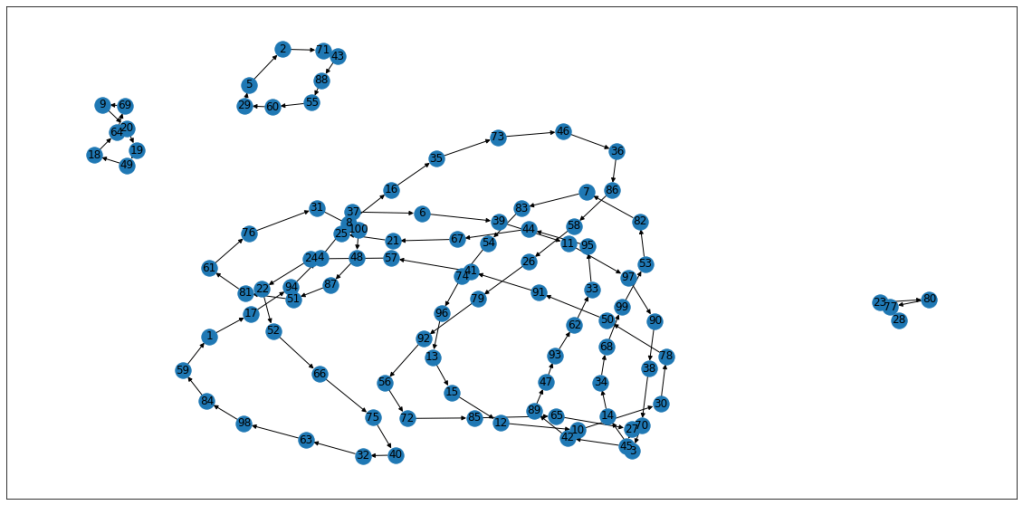
We want to test the theory that the id, box pairs exist in a closed loop. If we try it a couple of times and graph the output using networkx:
G = nx.DiGraph()
G.add_edges_from(boxes.items())
c = nx.recursive_simple_cycles(G)

nx.draw_networkx(G)
Try 1
You can see for example, prisoner no. 2, following this strategy, would get back to his ID within the requisite 50 tries. Any ID on the larger loop, would not get back to their ID within the maximum tries.
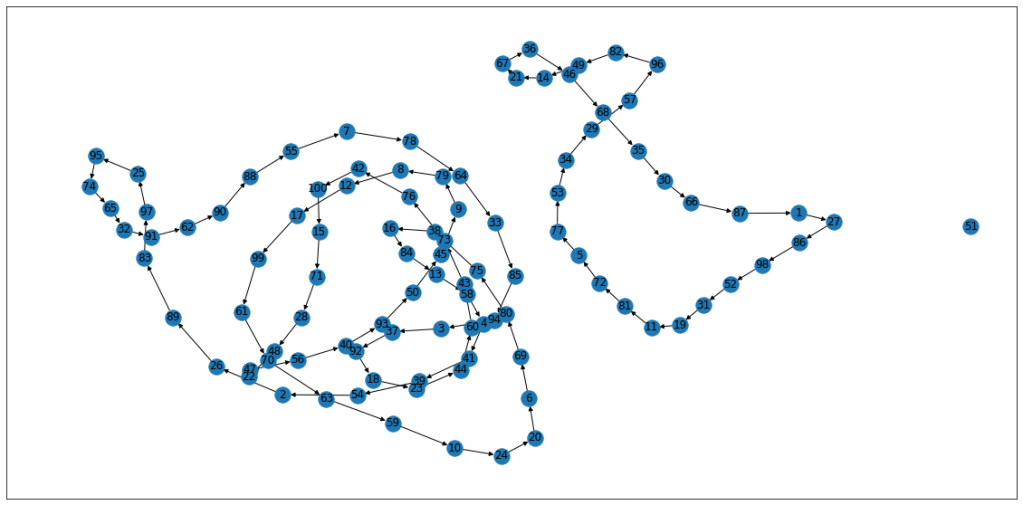
Try 2
Again, the IDs on the right form a loop of less than 50, so anyone following that strategy would eventually find their ID. We also have a loop of 1 for ID 51 in this iteration.
If you think about it, the overall probablity of success is directly linked to the chance that all “loops” are less than 50 long. That way if everyone followed the loop, everyone would be successful. We know that this happens about 30% of the time, so the overall probablity of success is 30%.
So we now want to test out the stragety by simulating each prisoner searching for their
#If we set default to true, and then switch it when a prisoner lands on a cycle longer than 50, it fails everybody.
overall_success = "Success"

#simulating prisoners by checking the length of the loop that they exist on. If it's too long, success = false.
for prisoner in prisoners:
found = False
    for c in cycles:
        if(prisoner in c):
            if(len(c) > 50): overall_success = "Unsuccessful"
If I run this 10 times, I get a mixture of successful and unsuccessful attempts.
There is 50/50 successful/unsuccessful in there, which isn’t representative of the overall probability. So let’s run it lots of times and see what the overall outcomes come out to.
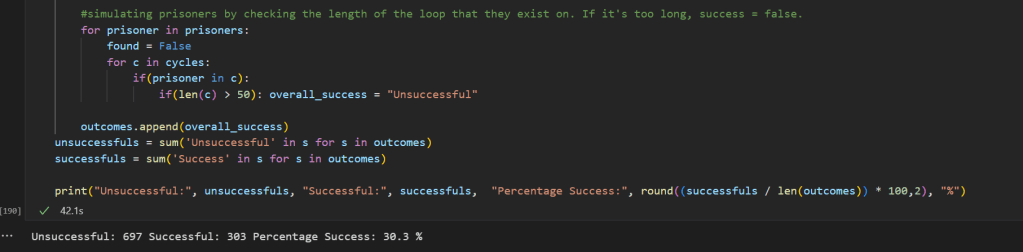
in 1000 tries, 303 succeeded using the loop strategy.
As you can see this is now representative of the probability of success. Full code is below which has the entire block in it:
import random
from collections import defaultdict
import networkx as nx
import pandas as pd
import matplotlib
import matplotlib.pyplot as plt
from collections import Counter


outcomes = []
for i in range(0,1000,1):
    prisoners = [*range(1,101,1)]
    box_num = [*range(1,101,1)]

    boxes = {}

    random.shuffle(prisoners)

    for box in box_num:
        boxes[box] = prisoners[box -1]

    G = nx.DiGraph()
    G.add_edges_from(boxes.items())


    c = nx.recursive_simple_cycles(G)
    #plt.figure(figsize=(20,10))
    #nx.draw_networkx(G)

    cycles = sorted(c)

    #If we set default to true, and then switch it when a prisoner lands on a cycle longer than 50, it fails everybody.
    overall_success = "Success"

    #simulating prisoners by checking the length of the loop that they exist on. If it's too long, success = false.
    for prisoner in prisoners:
        found = False
        for c in cycles:
            if(prisoner in c):
                if(len(c) > 50): overall_success = "Unsuccessful"

    outcomes.append(overall_success)
unsuccessfuls = sum('Unsuccessful' in s for s in outcomes)
successfuls = sum('Success' in s for s in outcomes)

print("Unsuccessful:", unsuccessfuls, "Successful:", successfuls,  "Percentage Success:", round((successfuls / len(outcomes)) * 100,2), "%")



 Analytics.net.nz